7 validators. 50+ ASINs simultaneously. Title, bullets, images, search terms, keywords — checked offline. No subscription. No cloud.
Paste one Amazon listing and see exactly which Amazon rules it breaks — the same checks that get listings suppressed or buried. No signup, nothing leaves your browser.
The Problem
Amazon suppresses listings for title violations, byte-limit overruns, and missing images — silently. With 50+ ASINs, there's no way to check them all manually.
A single forbidden character in your title or a search term over 250 bytes can trigger suppression — Amazon won't tell you which ASIN or why.
Listings with fewer than 7 images lose ranking. ALL CAPS words in titles violate style guidelines. These issues compound across hundreds of ASINs.
50 ASINs × 5 bullets × 7 validators = 1,750 checks. Opening Seller Central one by one isn't a process. It's a bottleneck.
Helium 10, Jungle Scout — €50–€150/month for features you don't need. You need a validator, not a platform. Pay once, use forever.
How It Works
No setup. No login. Open the file, import your data, get your results.
Double-click the HTML file. Works in Chrome, Firefox, or Edge. No installation. No internet required. Your data never leaves your computer.
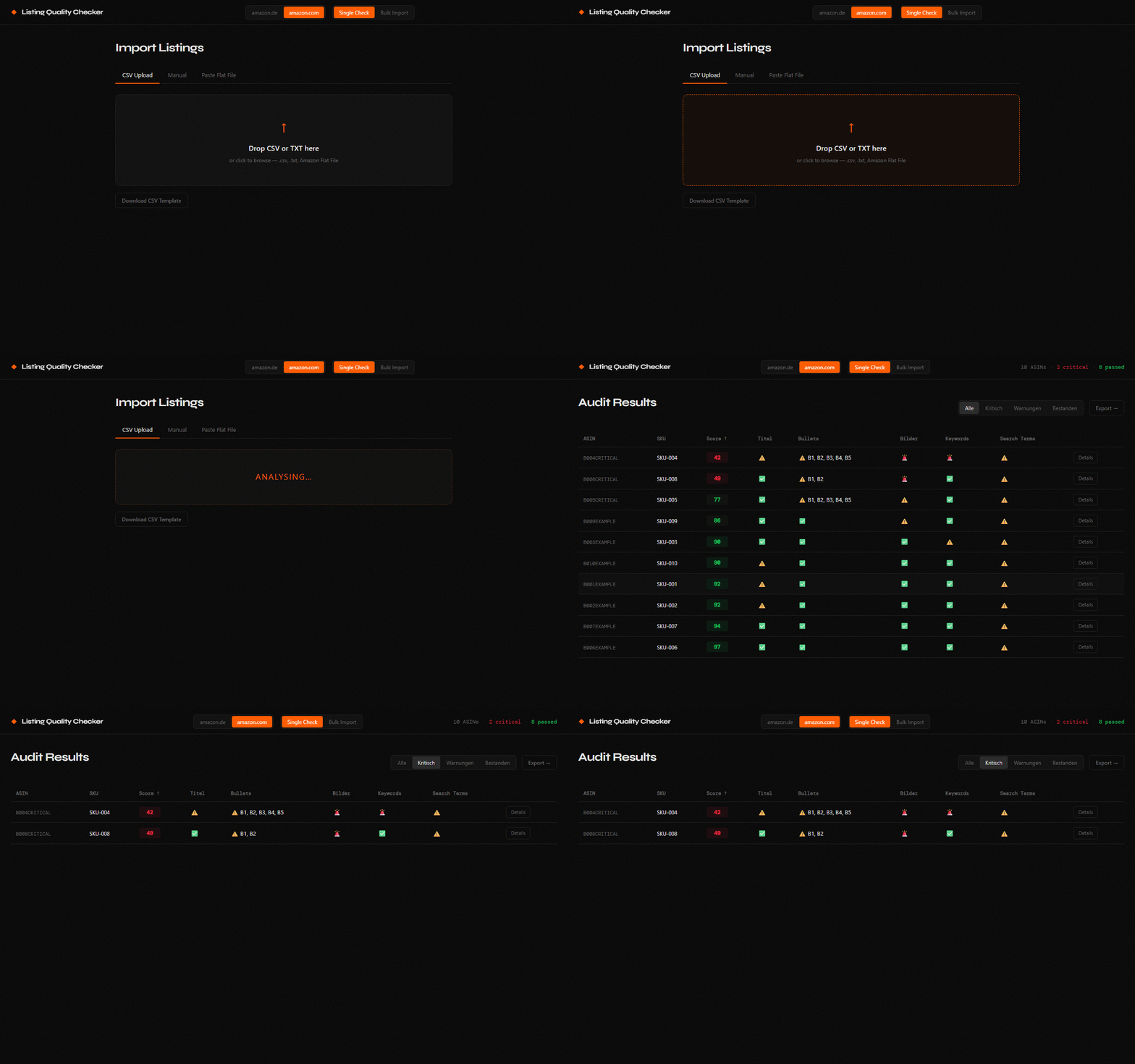
Drag & drop your CSV flat file, use the manual form for a single ASIN, or paste directly from Amazon Seller Central. Up to 50+ ASINs at once.
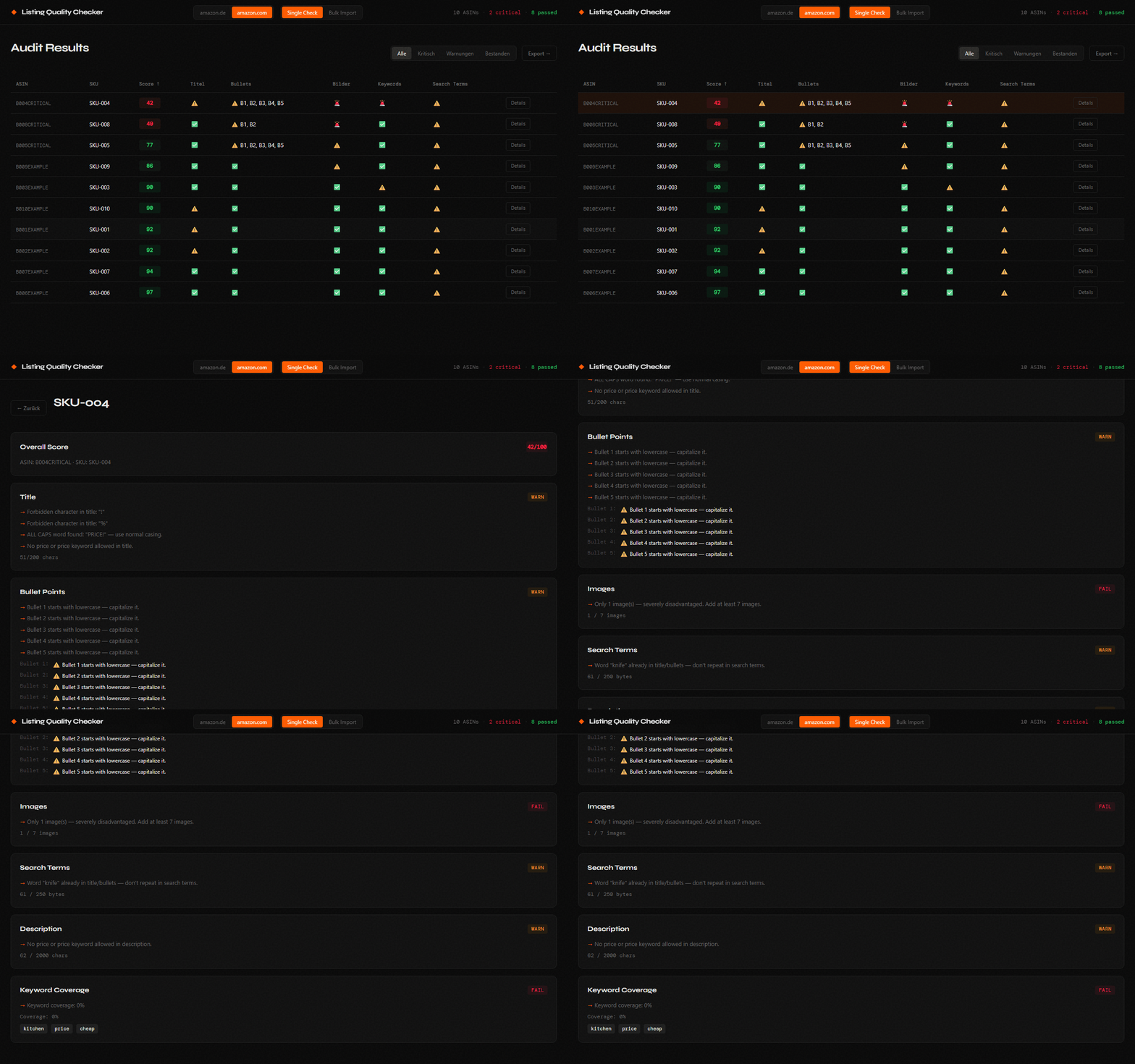
All 7 validators run instantly. Dashboard shows every ASIN sorted by score — worst first. Click any row for exact error messages and fix suggestions.
Export your full audit as XLSX or CSV. Share with your team or VA. Filter by Critical / Warning / Passed. Fix issues, re-audit in 60 seconds.
▶ Live demo — bulk import flow · click to expand
Validation Engine
Each validator returns an exact error message and a specific fix recommendation — not just a flag.
▶ Live demo — ASIN detail view · click to expand
Already Own the Single Tools?
If you've already bought the Bullet Point Validator, Image Count Validator, or Search Term Validator — this tool replaces all three and adds four more validators on top.
Running three separate tools for every ASIN is friction. The Listing Quality Checker runs all 7 validators simultaneously — for your entire catalog — in a single pass. One file. One click. Full picture.
The individual tools are great for quick spot-checks. This tool is built for catalog audits at scale.
Import Methods
Manual form for single checks, CSV bulk import for catalog audits, or paste directly from Amazon Seller Central flat files.
Fill in the form fields — ASIN, SKU, Title, up to 5 Bullet Points, Search Terms, Description, and Image Count. Results appear instantly. Best for spot-checking before a bulk run.
Drag & drop your CSV onto the import zone. Use the included bulk-template.csv as your starting point. All ASINs checked simultaneously — no loading screen.
asin, sku, title,
bullet1, bullet2, bullet3,
bullet4, bullet5,
search_terms, description,
image_count, marketplace
Copy your Amazon Seller Central flat file export and paste it directly. The tool auto-detects column names from the header row and maps them automatically. Compatible with standard inventory exports.
Features
Nothing leaves your browser. No server, no upload, no cloud. Your catalog data stays on your computer — always.
50 ASINs × 7 validators = 350 checks. Completes in under 5ms. No loading screen, no spinner, no waiting.
"Title is 215 chars — reduce by 15 to meet the 200-char limit." Not just a red flag. A specific fix instruction.
Live UTF-8 byte counter. German umlauts count as 2 bytes each. The tool catches overruns that character counters miss entirely.
Full audit report in Excel or CSV. Every ASIN, every validator status, every error message. Ready to share with your team or VA.
Toggle between amazon.de and amazon.com. UI language, error messages, and fix suggestions switch locale instantly.
Pricing
Instant download · Secure payment via Gumroad
Complete Your Amazon Stack
Optimizing a listing on the wrong product is wasted work. Validate whether your niche is structurally winnable before investing more time.
Check if my niche is viable → No-Sale DetectorYour listing can pass every format check and still not convert. Diagnose exactly which elements are stopping clicks from becoming sales.
Find why my listing isn't converting → Review Leak DetectorFormat violations won't fix a product complaint pattern. Find what buyers are actually saying before you rewrite anything.
Find the complaints hurting my sales → AdLeak FixerEven a perfect listing wastes money when PPC sends the wrong traffic. Find the search terms burning your budget with zero orders.
Stop my ad budget from leaking → Image ValidatorListings with fewer than 6 images lose ranking. Bulk-audit your entire catalog for missing image slots in 30 seconds.
Find listings losing rank due to missing images → Bullet Point ValidatorFlat file rejected? One bullet over 500 characters blocks your entire upload. Find the exact ASIN and field causing the rejection.
Fix my flat file rejections →Guides & Deep Dives
Everything you need to know about auditing Amazon listings — all 7 quality rules explained with exact thresholds and examples.
Read the guide → GuideHow to check 50+ ASINs at once using CSV flat file import — step-by-step from Seller Central export to XLSX audit report.
Read the guide → GuideWhy Amazon suppresses listings and how to find the exact violation — title rules, byte limits, image counts — across your whole catalog.
Read the guide →FAQ
No. 100% offline. All processing happens locally in your browser. Your ASINs, titles, bullets, and search terms never touch any server. You can disconnect from the internet and the tool works exactly the same.
Amazon counts bytes, not characters. German umlauts (ä, ö, ü) and other non-ASCII characters count as 2 bytes each in UTF-8. A field with 200 characters containing 60 umlauts is already 260 bytes — over the limit. The Listing Quality Checker uses a live UTF-8 byte counter in the detail view so you see the exact number.
Yes — this tool replaces and extends all three. It checks all 7 validators simultaneously, across your entire catalog, in a single file. The individual validators are great for quick spot-checks. The Listing Quality Checker is built for full catalog audits where you need to see everything at once.
50+ ASINs with no hard limit. The tool processes all listings synchronously in under 5ms. Performance depends on your browser, not a server.
Chrome, Firefox, and Edge (latest versions) are fully supported. Safari should work but is not officially tested. Internet Explorer is not supported.
Any single FAIL in any of the 6 validators automatically caps your overall score at 49 — regardless of how good the other fields are. A FAIL means Amazon is actively penalizing or suppressing that listing. Fix FAIL issues before addressing WARN items.
The tool accepts standard .csv files and .txt flat files from Amazon Seller Central. A bulk-template.csv is included in the download with 10 example ASINs so you can get started immediately. The flat file paste mode auto-detects column names from your header row.
One row per ASIN. Columns include: ASIN, SKU, Overall Score, and for each of the 7 validators: status (PASS / WARN / FAIL), score, and all error messages. The export is optimized for sharing with your team, agency, or VA.
Full catalog audit in 60 seconds. 7 validators.
Get the Tool →This tool is provided as a guidance resource to help you analyze and improve your Amazon product listings. It is intended to support — not replace — your own judgment and expertise. All decisions regarding your listings, including any changes made based on this tool's output, remain your sole responsibility. Smart Local Tools makes no guarantees regarding the accuracy, completeness, or fitness for purpose of this analysis.