Offline · Local · Private

The Invoice Generator That Stays on Your Device

No account. No cloud. No subscription.
Professional PDF invoices — directly in your browser, online or offline.
Buy once. Own forever.

No Account Required No Upload · No Cloud Works Offline One-Time Purchase Privacy-First PDF Export
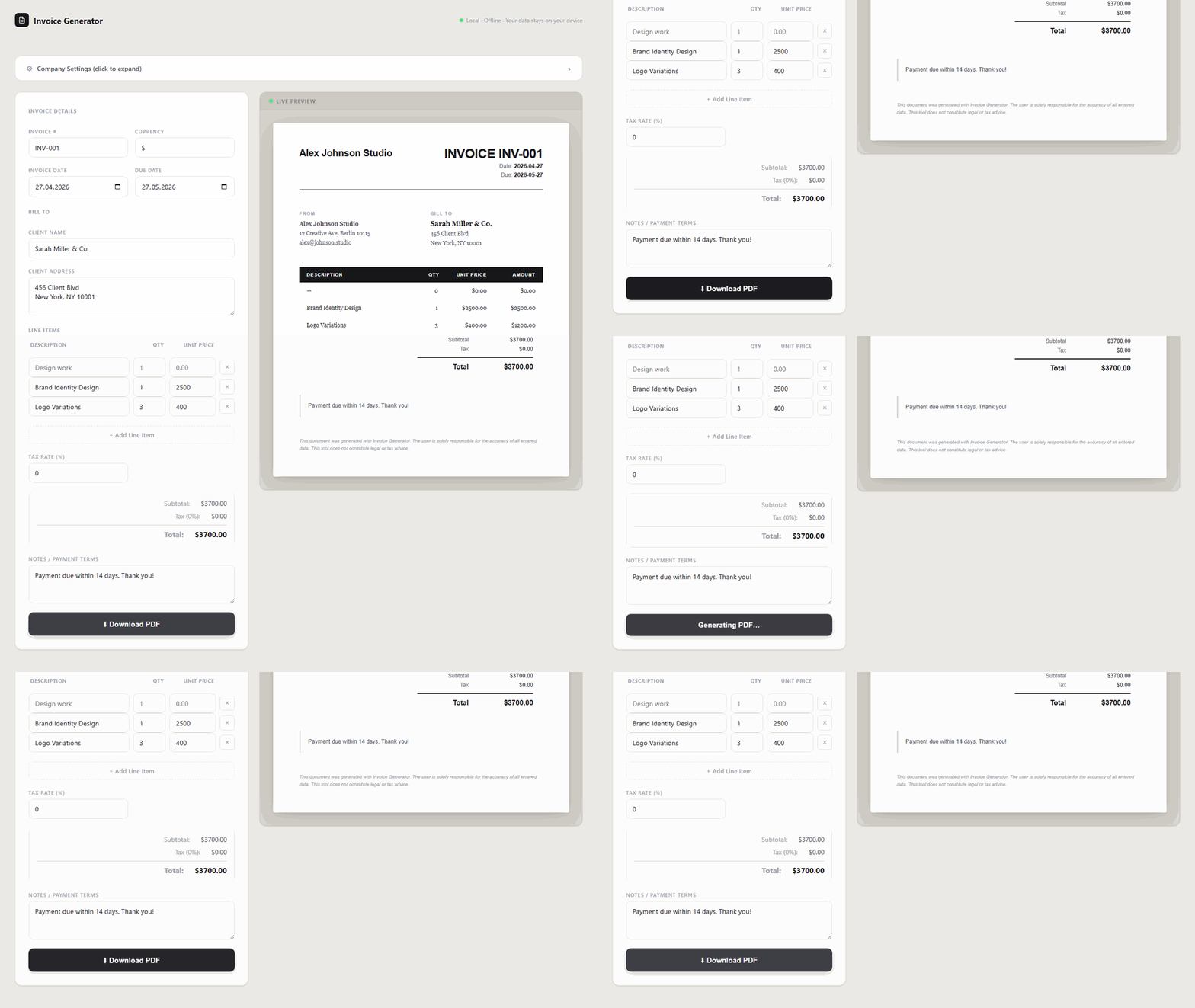
Invoice Generator showing a completed professional invoice with live preview and Download PDF button

Real product — no login, no cloud, runs in your browser  ·  Click to enlarge
The Problem

Tired of paying monthly just to send an invoice?

Most invoice tools treat you like a recurring revenue opportunity — not a person who just needs to get paid.

Subscription creep

$15/month. $20/month. $30/month. It adds up fast. You’re paying for invoicing buried inside a bloated suite you never fully use.

Forced sign-up walls

“Free” invoice generators gate every useful feature behind an account. Then they email you forever. Then they upsell you.

Your data in someone else’s cloud

Your client names, rates, invoice history — on a third-party server. One breach. One acquisition. One policy change. Gone.

Internet dependency

Working from a train, a remote cabin, or a venue with spotty WiFi? Good luck invoicing when the tool won’t load.

The Solution

Your client data belongs on your device

Invoice Generator runs entirely in your browser. No server. No account. No middleman between you and your invoice.

No internet required

Once downloaded, works anywhere — on a plane, in a basement, at a client site without WiFi.

No account, ever

Open the file. Start invoicing. No email address. No password. No activation. No tracking.

Zero data transmitted

The tool makes zero network requests. Nothing is uploaded, logged, or stored outside your device.

Buy once, own forever

No renewal. No price increase. No “we’re sunsetting this plan” email. Pay once. It’s yours.

Features

Everything you need. Nothing you don’t.

No bloat. No upsell. A focused, professional invoicing tool that does its job.

Live invoice preview

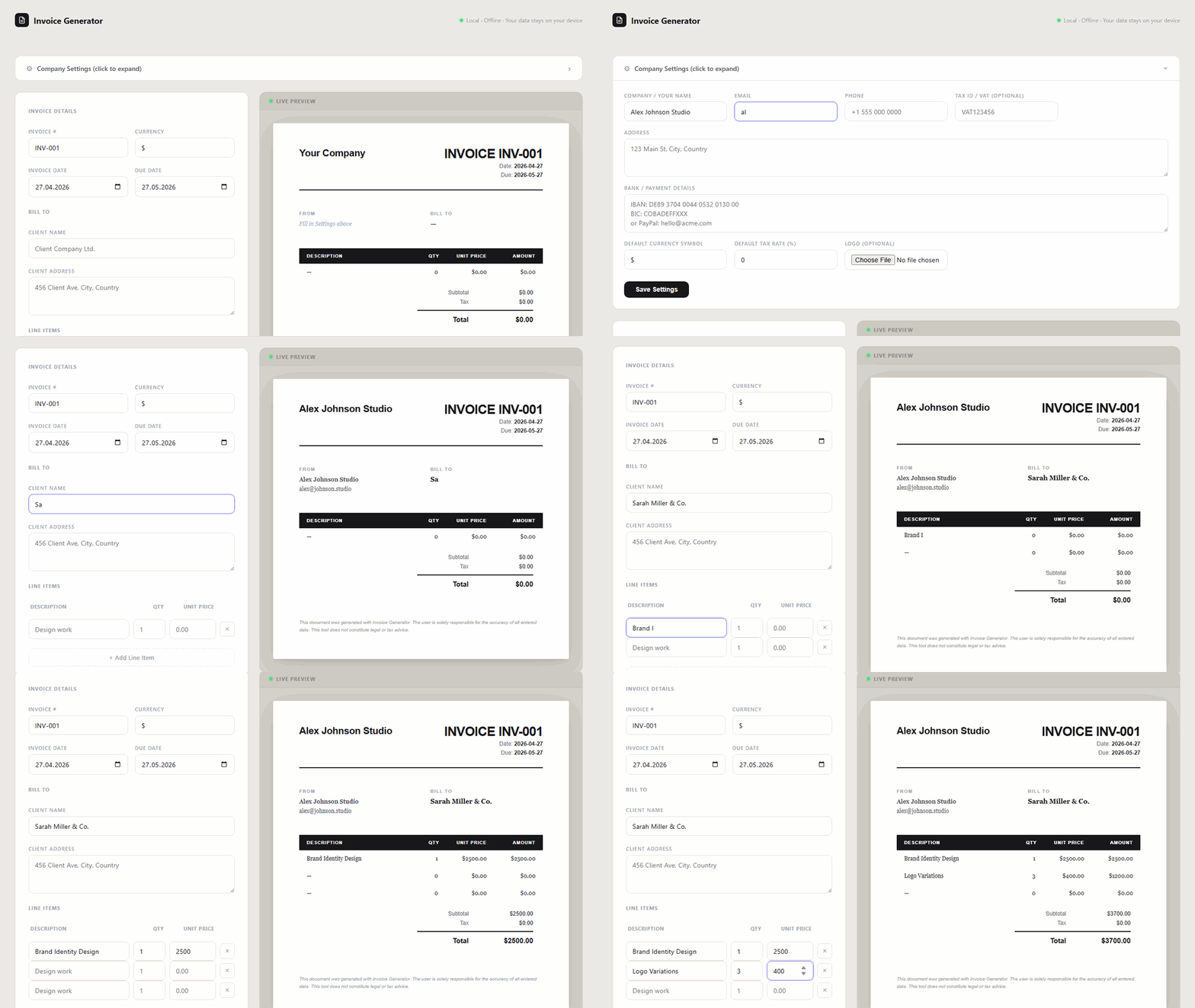
Your invoice updates in real time as you type. What you see is exactly what your client receives.

Professional PDF export

Generate a clean, professional PDF with one click — entirely locally, no server involved.

Logo upload

Add your business logo to every invoice. Stored locally in your browser as base64 — never uploaded.

Multi-currency

Set your preferred currency (USD, EUR, GBP or custom symbol). Supports international billing out of the box.

Auto invoice numbering

Invoice numbers auto-increment from your last invoice. Always editable if you need a custom format.

Precise tax calculations

Integer-based arithmetic eliminates floating point drift. Correct to the cent, every time.

Settings persist locally

Your company name, address, bank details, and logo are saved locally between sessions. Fill once, invoice forever.

Any device, any OS

Runs in any modern browser on Windows, macOS, Linux, and ChromeOS — desktop or laptop.

How It Works

From download to invoice in 60 seconds

No install. No setup. No configuration wizard. Three steps and you’re billing.

Buy & download

Purchase once on Gumroad. You receive a single HTML file. Download it to your computer.

Open in your browser

Double-click the file. It opens in Chrome, Firefox, Safari, or Edge — with or without internet.

Invoice & export PDF

Fill in your company info once. Add client and line items. Click Download PDF. Done.

Invoice Generator: filling in company name, client details and line items while the live preview updates in real time

Live preview updates as you type — no save button needed  ·  Click to enlarge

Who It’s For

Built for people who work for themselves

If you bill clients, deliver projects, or sell your time — this tool was made for you. You don’t need an accounting suite. You need an invoice.

Freelance Designers Web Developers Copywriters & Editors Consultants Marketing Freelancers Photographers & Videographers Coaches & Trainers Solo Founders IT & Support Contractors Architects & Engineers Translators VA & Remote Assistants
Comparison

Cloud invoicing tools vs. Invoice Generator

Most invoice tools are built for their recurring revenue — not yours. Here’s the honest difference.

Feature Cloud SaaS
(FreshBooks, Wave, QuickBooks)
Invoice Generator
Monthly fee   $10–$35/month   One-time purchase
Account required   Always   Never
Data stored in cloud   On their servers   Stays on your device
Works offline   Internet required   Full offline support
Privacy   Privacy policy applies   Zero data transmitted
PDF export   Yes (via server)   Yes (100% local)
Vendor lock-in   Data trapped in their system   You own the file
Internet dependency   Required   None
Privacy-First

Zero data leaves your device. Ever.

Not “minimal data.” Not “anonymized data.” Zero. Invoice Generator is architecturally incapable of uploading anything.

Pricing

One price. No tricks.

No tiers. No trial. No “starter plan” that locks half the features.

Invoice Generator

Buy once. Use forever.

You get the complete tool. All features. No expiry. No upgrade prompts. No surprises.

  • Single HTML file — download and own it
  • Works offline in any modern browser
  • PDF export — 100% local, no server
  • Logo upload, multi-currency, tax rates
  • Auto invoice numbering
  • No account. No subscription. No renewal.
  • Your data never leaves your device
Get Invoice Generator on Gumroad →

Secure checkout via Gumroad · Instant download after purchase

FAQ

Frequently Asked Questions

Does Invoice Generator work offline?
Yes. Invoice Generator is a single HTML file that runs entirely in your browser. Once downloaded, it works without any internet connection — on a plane, in a café with no WiFi, or anywhere else.
→ Full guide: Offline Invoice Generator
Do I need to create an account?
No. There is no account, no sign-up, and no login — ever. Open the file in your browser and start invoicing immediately.
→ See why freelancers choose Invoice Generator
Where is my data stored?
Your company settings (name, address, bank details, logo) are saved in your browser’s localStorage — on your device only. Invoice data (client, line items) is session-only and is never saved or transmitted anywhere.
What browsers does it work in?
Invoice Generator works in any modern browser: Chrome, Firefox, Safari, Edge, and Brave — on Windows, macOS, Linux, and ChromeOS.
Does it generate real PDF files?
Yes. PDF generation happens 100% locally in your browser using an embedded library. No data is sent to any server. The PDF is created and downloaded directly on your device.
Is this a subscription?
No. Invoice Generator is a one-time purchase. You buy it once and own it forever — no monthly fees, no renewal reminders, no price increases.
→ See how Invoice Generator compares to FreshBooks & Wave
What happens to my data if I close the browser?
Your company settings persist in localStorage and will be there next time you open the file. Invoice data (client info, line items) is intentionally session-only and clears when you close the tab — your client’s data is never stored anywhere.
Is this tool GDPR-compliant?
Yes. Invoice Generator collects zero data. It makes no network requests, has no analytics, no cookies, and transmits nothing. Your client data and invoice data never leave your device.
Can I use it on Mac and Windows?
Yes. It works on any operating system that runs a modern browser — Windows, macOS, Linux, and ChromeOS.
What is the difference between this and FreshBooks or Wave?
FreshBooks and Wave are cloud SaaS tools: they require an account, store your data on their servers, charge monthly fees, and require an internet connection. Invoice Generator is the opposite: no account, no cloud, no subscription, works offline, and your data never leaves your device. You pay once and own the tool forever.

Stop paying monthly.
Start invoicing locally.

One HTML file. Your device. Your data. Your invoice.

Get Invoice Generator →
More Tools

More free & paid tools from smart-local-tools.com

Every tool works offline. No subscription. No cloud.

Listing Analyzer

Amazon Listing Analyzer

Audit your Amazon listing for keyword gaps, conversion blockers, and structural weaknesses.

Analyze my listing →
Comparison Tool

Listing Comparison

Compare your listing side-by-side against competitors to find exactly where you’re losing.

Compare listings →
Conversion Audit

No-Sale Detector

Traffic but no sales? Diagnose which listing elements are failing your paid visitors.

Find why traffic isn’t converting →
Risk Checker

Amazon Risk Checker

Spot account health risks, policy violations, and suspension triggers before Amazon does.

Check my risk →
PDF Tool

PDF Tool

Process, merge, split, and edit PDFs locally in your browser. No upload, no cloud, no account.

Open PDF Tool →