CC Fees Vary by Plan
From 5% + $0.30 on Starter down to 2.15% + $0.30 on Plus — on 1,000 orders that difference is thousands of dollars.
Most Shopify sellers look at revenue and assume they're profitable. This calculator shows you the real number — after CC fees, transaction fees, COGS, shipping, refunds, ad spend, and plan costs. All 5 plans. Works offline. One-time download.
Free · Runs in your browser · Nothing uploaded
Pricing a product on Shopify? Pick your plan and enter your numbers below — see your real net profit per sale, live, after Shopify's fees.
This free calculator shows your net profit per sale on one product. The full Shopify Profit Calculator compares all 5 plans side by side, models third-party gateways, runs your whole catalog via bulk CSV, and shows ROI, break-even, and a fee breakdown chart — 100% offline, one-time purchase, no subscription, no login.
Get the full Shopify Profit Calculator →See It In Action
Two short demos. Click any card to watch full screen.
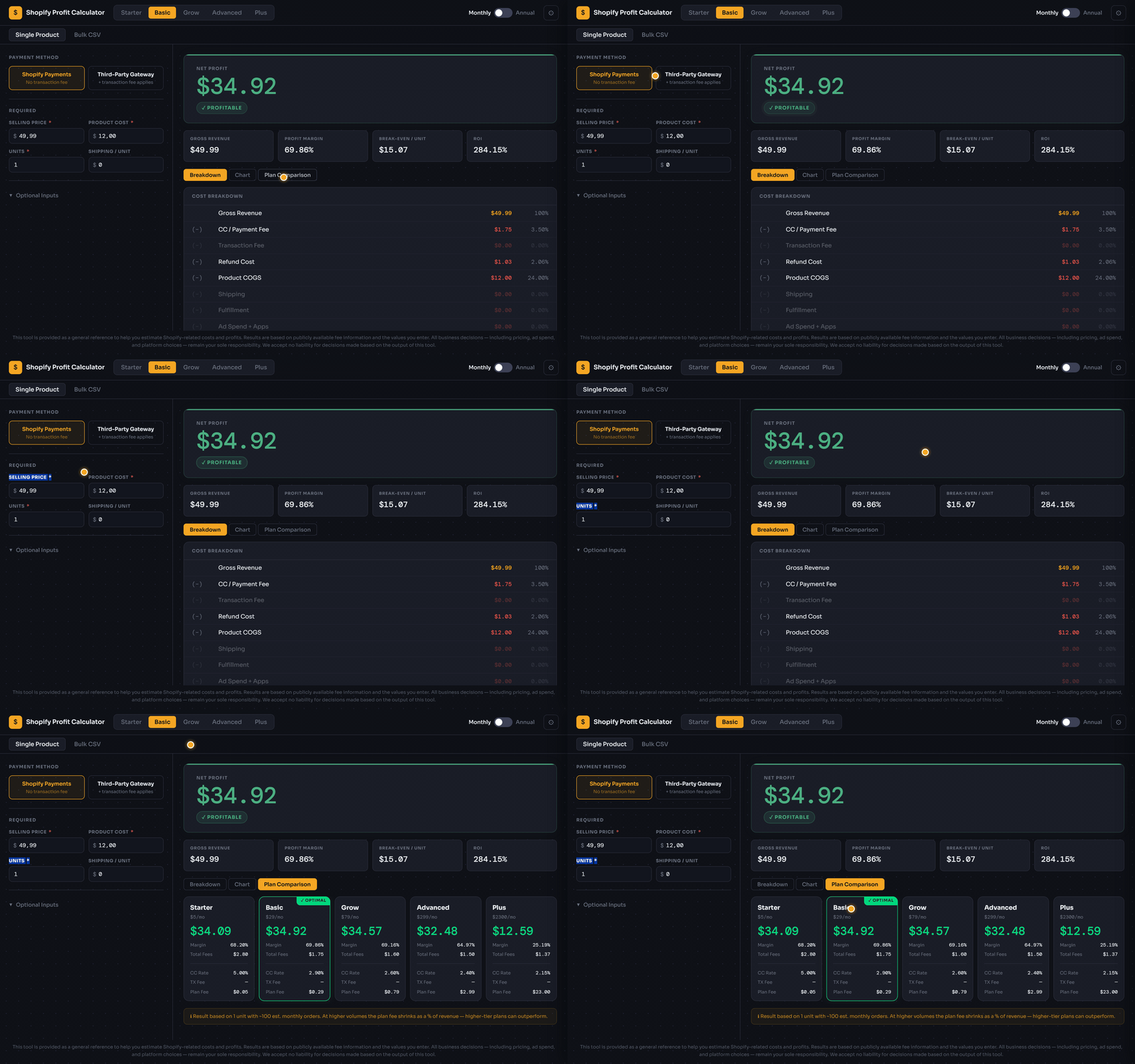
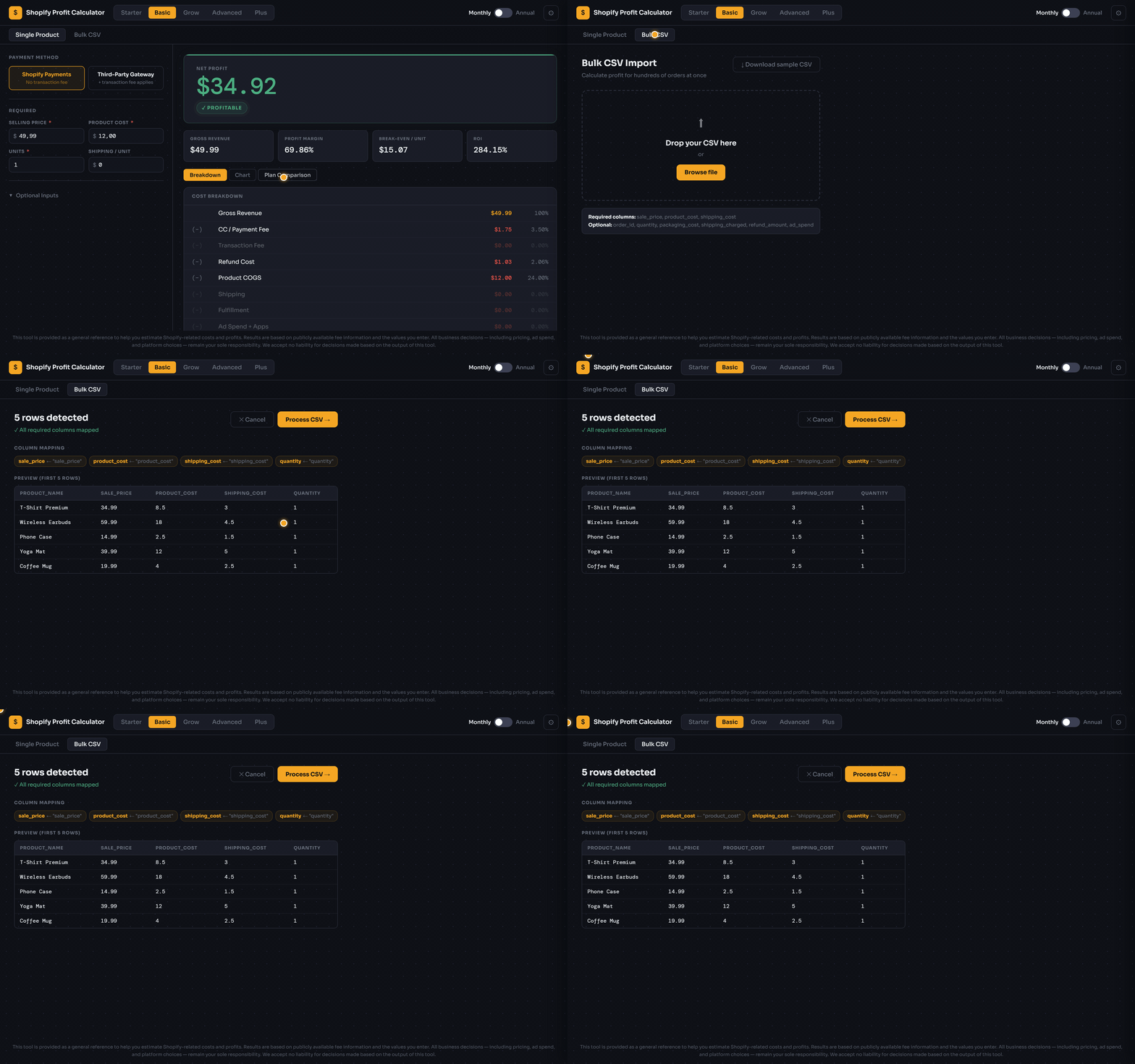
Click to expand · Press ESC to close
The Hidden Cost Problem
Gross revenue looks great. But after Shopify's fees, your gateway, returns, ads, and shipping — how much do you actually keep?
From 5% + $0.30 on Starter down to 2.15% + $0.30 on Plus — on 1,000 orders that difference is thousands of dollars.
Using Stripe or PayPal? Shopify adds an extra 0.2%–2% transaction fee on top of your CC rate. Most sellers forget to account for this.
A refund doesn't just lose you the revenue — you also lose the CC fee on the refunded amount. That's double the damage.
That $79/month Grow plan? At 50 orders per month it adds $1.58 per order. At 10 orders, it's $7.90 per order. Volume changes everything.
What's Inside
Every input updates the result instantly — no Calculate button, no page reload. Watch your net profit change as you adjust price, COGS, or plan.
One click compares all 5 Shopify plans side-by-side using your exact inputs. The most profitable plan is highlighted automatically.
Drop in a spreadsheet of orders. Every row is processed through the full fee engine. Export results with all calculated fields.
Download once. Open the HTML file in any browser. No server, no internet, no account. Your business data never leaves your computer.
Beyond net profit — see margin %, ROI, break-even price per unit, and fee efficiency score in one dashboard.
How It Works
You receive one file: shopify-profit-calculator.html. Save it anywhere on your computer — Desktop, Downloads, wherever is convenient.
Double-click the file. It opens directly in Chrome, Firefox, Safari, or Edge. No installation, no server, no internet connection required from this point on.
Choose from all 5 plans (Starter, Basic, Grow, Advanced, Plus) and toggle between monthly and annual billing. Select Shopify Payments or Third-Party Gateway — the correct fee rates load instantly.
Selling price, product cost, units, shipping per unit. Optionally add ad spend, fulfillment cost, and refund rate. Every field updates the result live — no Calculate button needed.
Net profit, profit margin %, ROI, and break-even price per unit — all itemized by fee layer. Switch to Plan Comparison to instantly see which Shopify plan is most profitable for your numbers.
Transparent Calculation
No black boxes. The full calculation chain is open-source and visible in the tool's source code.
2026 Verified Fee Rates
The tool includes all five current plans with up-to-date CC rates and transaction fees.
| Plan | Monthly | Annual / mo | CC Rate (Online) | 3rd-Party Fee | In Calculator |
|---|---|---|---|---|---|
| Starter | $5 | $5 | 5% + $0.30 | 5% | ✓ |
| Basic | $29 | $25 | 2.9% + $0.30 | 2% | ✓ |
| Grow | $79 | $65 | 2.6% + $0.30 | 1% | ✓ |
| Advanced | $299 | $229 | 2.4% + $0.30 | 0.6% | ✓ |
| Plus | $2,300 | $2,300 | 2.15% + $0.30 | 0.2% | ✓ |
Frequently Asked Questions
Yes. After downloading, open the HTML file directly in any browser. No internet connection, server, or account required. Your data never leaves your device.
All five: Starter, Basic, Grow, Advanced, and Plus — with verified 2026 fee rates for both monthly and annual billing, and both Shopify Payments and third-party gateways.
Yes. The Bulk CSV mode lets you import a spreadsheet of orders. Every row runs through the full fee engine. Export results as CSV with all calculated fields included.
CC / payment processing, Shopify transaction fee (third-party), refund cost (including lost processing fees), product COGS, shipping, fulfillment, ad spend, and prorated plan cost per order.
Yes. The Plan Comparison tab shows all 5 plans side-by-side for your current inputs and marks the most profitable one with a Best For You badge.
Fee updates may be released as new versions. All fee constants are clearly labeled at the top of the source code, so technically-inclined users can update them in under a minute.
Download once. Use forever. Your product data stays on your computer — always.
This tool is provided as an informational aid to help Shopify merchants estimate profit margins and fee structures based on publicly available fee data. All results are calculations based on the inputs you provide and are intended for guidance purposes only. They do not constitute financial, accounting, or business advice. Fee structures, platform policies, and applicable rates may change; always verify current figures directly with Shopify and your payment provider. The user assumes full responsibility for all business decisions made based on or influenced by the outputs of this tool. Smart Local Tools accepts no liability for any loss, inaccuracy, or consequence arising from the use of this calculator.